Entradas

Obito KAMUI

we have more than 1 year working on this, because I stopped coding for SA. it gave us a lot of problems this thing... but finally here is... You can find it, in my ARCHIVE as Obito Kamui How to USE;   (watch video) Aim Weapon =  to aim a ped Aim Weapon + Fire Button   =  to select ped for jutsu TAB + 1   = to teleport into map TAB + 2 (or fall) = to go back  Author Notes; --by default is turned on. to turn it off, open -> obito_config.ini and change this; [MODE] value = 1 for this; [MODE] value = 0 --if you don't like to kill peds, change the "quantity" of damage that will receive the ped. [HEALTH] value = 100 --if you don't like Shader Effects, change this; [SHADER] value = 1 for this; [SHADER] value = 0 I added the skin also, it is fully compatible with my HUD-full burst. to change the skin type as a Cheat;  tobiskin or do it by your own way. WARNING: Shader Effects needs that your Graphic Card ...

Wanted Level Alarm

I'm going to start uploading all those personal scripts that I ever done... :P some of them are funny, but this one, always put me nervous while I had any wanted level in game :P check it by yourself as always, you can find it in my ARCHIVE here is a preview of the code; {$CLEO} const     path_song1   = "cleo\mp3\alarm3.MP3"     path_song2   = "cleo\mp3\alarm2.MP3"     path_song3   = "cleo\mp3\alarm1.MP3" end 0000: :start wait 0 if or 8AAB:  not file_exists path_song1 8AAB:  not file_exists path_song2 8AAB:  not file_exists path_song3 then     0A93: end_custom_thread   end :main wait 0 01C0: 15@ = player $PLAYER_CHAR wanted_level if 15@ == 6 then         2@ = 6         3@ = 6         0AAC: 0@ = load_mp3 path_song1         wait 100         0AAF: 1@ = get_mp3_length 0@         1@ ...

HUD Naruto Ultimate Ninja Storm 3 - Full Burst [PC]

Imagen
first of all, this hud is one of my personal mods, I did this for me. but finally I decided  to release it. -sorry people, it seems that this is only compatible with WideScreens (16:9/16:10) -textures looks bad in square resolutions (4:3) (please, report me with an a screen capture of your game, to see if I can make it compatible) what do you need? CLEO 4.3.16 NewOpcodes2.0 by DK22PAC   |--->   Here ALL textures were Extracted/Converted/Edited from NUNS 3 Full Burst PC  by me (J16D) you can download the hud in my ARCHIVE (HUD full burst)

CLEO Shader API - Part 1

Imagen
I hope you understand HLSL language.. I'm not going to explain anything related to that topic, search in google for it. now to use this shaders you need; CLEO 4 Shader API plugin installed properly knowledge about HLSL knowledge about CLEO (you can find shader API in the previous post)

CLEO Shader API - Introduction

Imagen
yes, exactly as it sounds. and No I'm not using MTA for this... first, the autor of this CLEO Shader-API is DK22Pac you can follow the link, and you will find basic information. unfortunately is not quite enough. :/ that's why I'm going to talk about this, in this week. here you can see what I have done with this;

$INCLUDE command

Imagen
Sometimes, is usefull to hide some part of the code, to avoid confusion, and also to make it cleaner... or to hide some important code that we will use through the code. the Include command looks like; {$INCLUDE [NAME OF FILE]} or it can also looks like; {$I [NAME OF FILE]} the $I is the same as $INCLUDE the file we are going to Include must go, in the same place, where we keep our script.cs

Declare a New Custom Variable with const-end

Imagen
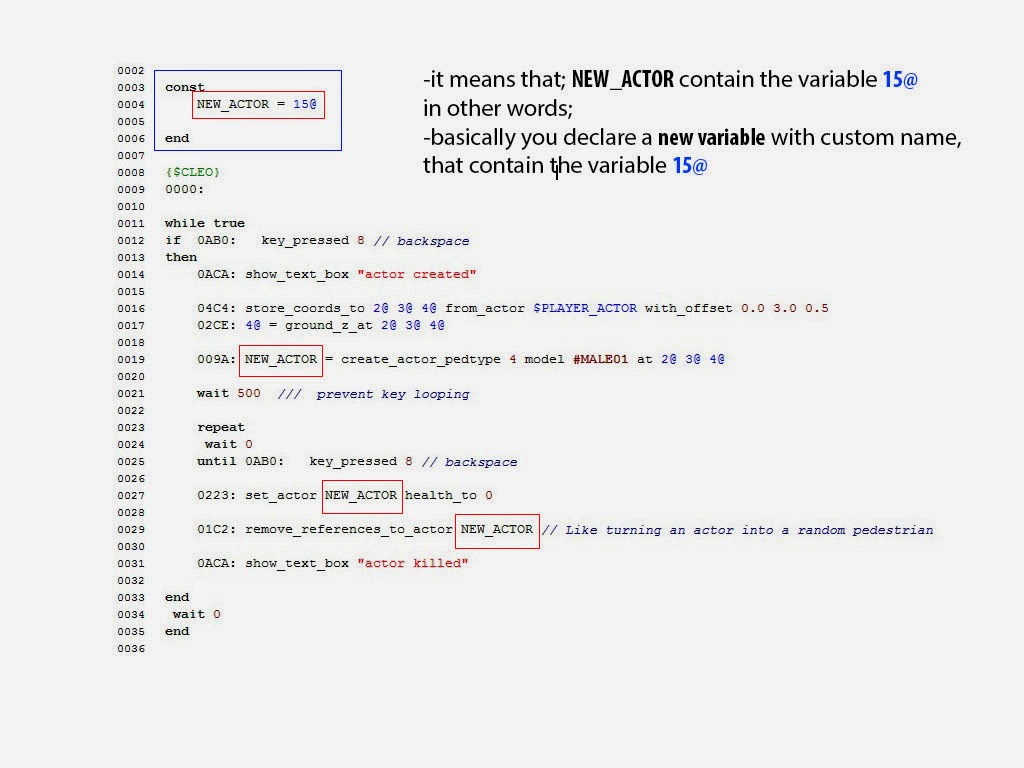
let's jump directly to the example; CODE when you compile the Script, automatically Sanny builder will going to replace each custom variable ( NEW_ACTOR ) for the variable 15@ . with this, we save time. Because, in case we want to replace the variable 15@ for 10@ . then we don't have to change the variable throughout the script. we only need to declare inside const - end that NEW_ACTOR is equal to 10@ for example; we can also store a File Path, and it works in the same way as above. this works for everything. we can store coords;