Entradas

GOSUB && CALL SCM

Difficulty: Easy What is GOSUB?  What is CALL SCM function? How do we use them properly? GOSUB   gosub is a sub-process that normally we use, when we want to hide some action in the code.  It takes all the variables used in the thread. the gosub has this form: gosub @sub_routine :sub_routine {code} return the code will automatically jump to the :sub_routine Label, when the job is done, will return to the same point. to understand better, I'll show you some examples:

Marvel Spider-Man

Imagen
This kind of stuff would be really easy to do, once Spider-Man starts swinging, he becomes just like a pendulum. His motion is determined by the length of the web along with the starting angle. From a forces view, there is mostly just the tension in the web and the gravitational force pulling down on him.  The key parameters to consider are the swinging angle, the time for one swing and the distance of one swing. Here’s a picture. yes, that easy.  BUT, unfortunately, this isn't possible in SA.  sadly :( I'll talk about, what I did, later. Until now, these are the animations that I've done, to obtain what you see in the video: They are 26 animations and  are based on "The Amazing Spider-Man 2 Game" do I should add more animations?...   which animations? and to do what? suggestions are welcome...  ps. if someone can do better animations than me, tell me.... ;) your help would be great. ;)

Iron Man Cleo Code Snippets

To this mod, I've created a couple of functions to make everything easier. for example: laser-beam I'm going to post those functions to you to be able to use them. LASER BEAM :Ibeam //0AB1: create @Ibeam 11 MP3Sound -1 actor $PLAYER_ACTOR originXYZ 4@ 5@ 6@ targetXYZ 8@ 9@ 10@ radius 0.120 explosionType 10 delayTime 700 const BeamSound = 11@ Iplayer = 12@ originX = 13@ originY = 14@ originZ = 15@ targetX = 16@ targetY = 17@ targetZ = 18@ Iradius = 19@ expType = 20@ delTime = 21@ end 0085: BeamSound = 0@ // (int) 0085: Iplayer = 1@ // (int) 0087: originX = 2@ // (float) 0087: originY = 3@ // (float) 0087: originZ = 4@ // (float) 0087: targetX = 5@ // (float) 0087: targetY = 6@ // (float) 0087: targetZ = 7@ // (float) 0087: Iradius = 8@ // (float) 0085: expType = 9@ // (int) 0085: delTime = 10@ // (int) if not BeamSound == -1 then 0AB9: get_mp3 BeamSound state_to 29@ if 29@ <> 1 // not playing then ...

GTA SA Marvel Iron Man V1.0 Released!

Imagen
To download, go to my ARCHIVE and find MARVEL folder. MARVEL IRON MAN V1.0 Notes: -Open the file named Support.chm   and read it carefully. Read everything, before you do something!. Tips: Press key B - and you'll be able to move the mouse around armor. While flying (fast) press key P to change camera view. Edit. -I forgot to comment, for Automatic installation you need to have .Net FrameWork 2.0 in your PC. Finall notes: -Special thanks to Endy Voon , a Youtube user for their Particle tutorial. ;) Have Fun! Next Mod: Spiderman ;)

Cleo Scripts dependencies - Marvel Iron Man

Imagen
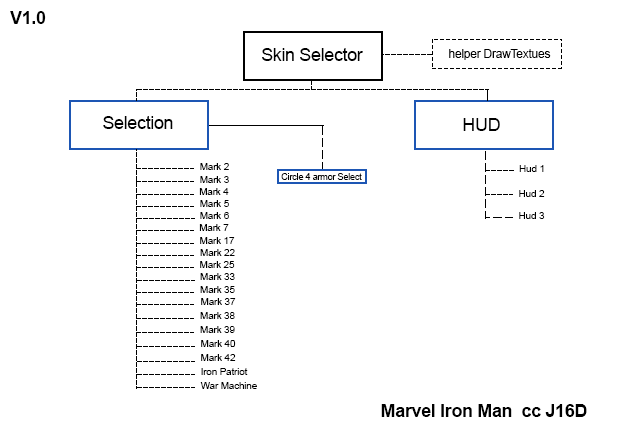
a diagram to show how my Cleo scripts are working. they are linked between each other, to give access or to stop the process. the Main script is the Skin Selector. it will be the only One *.cs file inside cleo folder. To avoid overload of scripts inside folder. basically you can ONLY have access to IronMan features if you use my skin selector. it is one script by each name showed in the image. I'll try to create a SkinSelector user-friendly and customizable.

Progress Iron Man GTA San Andreas[CLEO]

Imagen
good news! :D  the main script is almost done ;) I'll start to work on the HUD.... I hope to release this in these days. I only need to make some test and tweaks... ;) a preview:

[SPANISH] Creando cheats Cleo 3/4

NOTA: entrar al post para ver bien la syntaxis. comunmente vemos mucho Scripts que tienen un monton de números que no entendemos, y magicamente al escribir un Cheat en el teclado, se activa. bueno, no hay tanta "magia" en eso, solo es necesario entender que existen diferentes formas para crear un Cheat. CLEO 3 Cleo 3 tiene la particularidad de utilizar más codigo para realizar algo, requiere un poco más de conocimientos en leguajes de programación. Esto se debe a que no existe acceso directo a algunas carácterísticas.  Como a continuación, les enseñaré: Información básica: 0A8D: 0@ = read_memory 0x00969110 size 4 virtual_protect 0 Parámetros: 1. variable que almacena la información 2. Dirección de la memoria 3. Número de bytes para leer/escribir (1, 2 o 4) 4. Protección virtual: 1 = Solo-lectura, 0 = re-escribible Strings:(Texto) en Cleo, para asignar o guardar un Texto en una variable, existen variables específicas. NO podemos guardar un texto en una variabl...